King James Bible
| Technical Specification |
Download |
| Latest Updated |
|
|
| Latest Version |
3.4.1 |
| Developer |
Salem New Media |
| Operating system |
Android |
| Language |
English |
| Price |
Free |
| Available version |
3.4.1 |
| Version history |
3.2.2 3.2.1 3.1.1 3.0.1 3.0 |
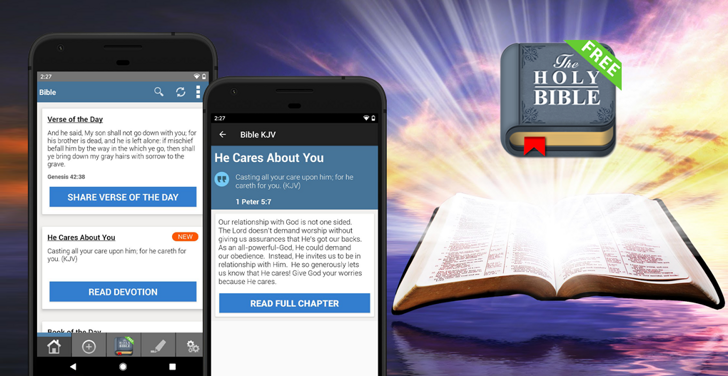
King James Bible Study KJV gives you convenient access to the complete King James Version for reading, listening, and daily study. Read Scripture offline, search for verses or keywords, and follow audio narration when you prefer to listen. Daily verses and morning or evening devotionals offer regular inspiration, while bookmarks, highlights, and personal notes help organize your study. You can also share meaningful passages with friends and family wherever you are during daily prayer and study.
More Details
Below are some of the notable features of the app:
- Provides the complete King James Version Bible with offline reading access.
- Includes audio narration, daily Bible verses, and morning and evening devotionals.
- Offers search tools, bookmarks, colorful highlights, and personal study notes.
- Allows users to share selected verses with friends, family, and other readers.
How to install the application
How to download and install King James Bible on your mobile device?
Follow these simple steps to get the King James Bible from Google Play:
- Open Google Play on your Android device.
- Enter King James Bible in the search bar.
- Choose the most relevant result from the list.
- Tap 'Install' to start the download.
- Wait until the installation is complete, and you're ready to go!
DISCLAIMER
- This application is a mobile tool that does not modify any system settings on your device.
- All APK files available for download from our platform are completely safe.
- We offer the official download link directly from the Google Play Store.
- All trademarks and logos featured on our website belong to their respective owners. We have no affiliation or partnership with them.
- Our website and its content fully adhere to Google's advertising policies and the Google Unwanted Software policy.
Steps to Uninstall android App
How to remove King James Bible from your mobile device?
You can uninstall the King James Bible app by following these steps:
- Open the Settings menu on your phone.
- Navigate to "Apps" or "Application Manager."
- Find and select King James Bible from the list.
- Tap "Uninstall" to remove the app from your device.
Steps to Uninstall App on Apple devices
Delete King James Bible from your iOS device by following these steps:
- Open your Home Screen or App Library and locate the King James Bible icon.
- Press and hold the icon until a set of options is displayed.
- Select Remove App from the list.
- Confirm deletion by tapping Delete App.
- Exit the screen by tapping Done or pressing the Home button.
Tips & Tricks
More about the King James Bible app
- Download or open the Bible before traveling so you can continue reading without internet access.
- Use bookmarks, highlights, and notes to organize important passages and study topics.
- Search by verse reference or keyword to locate specific Scripture quickly.
- Listen to the Audio Bible while commuting, exercising, or completing daily tasks.
- Enable daily verses and devotionals to maintain a regular reading routine.

























 Home
Home  Tools
Tools  Finance
  Social
  Games
Games  Communication
  Shopping
  More
More 






