Remote Control For TV
| Technical Specification |
Download |
| Latest Updated |
Sep 24, 2021 |
|
| Latest Version |
1.9.1 |
| Developer |
SoomApps |
| Operating system |
Android |
| Language |
English |
| Price |
Free |
| Available version |
1.9.1 |
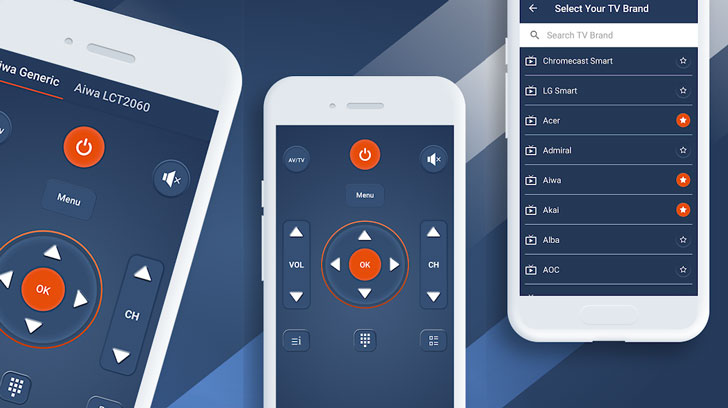
Remote Control For TV turns an Android phone or tablet into a controller for televisions and compatible entertainment devices. Connect through Wi-Fi for supported smart TVs or use a built-in infrared blaster with traditional models. Navigate menus, change channels, adjust volume, control playback, and access familiar remote buttons from a simple interface. Broad brand support helps replace a lost or damaged remote and reduces the need to manage several separate controllers around the home.
More Details
Below are some of the notable features of the app:
- Controls supported televisions through Wi-Fi or infrared technology.
- Provides channel, volume, menu, and playback controls.
- Works with a broad selection of television manufacturers.
- Recreates a familiar physical remote-control layout.
How to install the application
How to download and install Remote Control For TV on your mobile device?
Follow these simple steps to get the Remote Control For TV from Google Play:
- Open Google Play on your Android device.
- Enter Remote Control For TV in the search bar.
- Choose the most relevant result from the list.
- Tap 'Install' to start the download.
- Wait until the installation is complete, and you're ready to go!
DISCLAIMER
- This application is a mobile tool that does not modify any system settings on your device.
- All APK files available for download from our platform are completely safe.
- We offer the official download link directly from the Google Play Store.
- All trademarks and logos featured on our website belong to their respective owners. We have no affiliation or partnership with them.
- Our website and its content fully adhere to Google's advertising policies and the Google Unwanted Software policy.
Steps to Uninstall android App
How to remove Remote Control For TV from your mobile device?
You can uninstall the Remote Control For TV app by following these steps:
- Open the Settings menu on your phone.
- Navigate to "Apps" or "Application Manager."
- Find and select Remote Control For TV from the list.
- Tap "Uninstall" to remove the app from your device.
Steps to Uninstall App on Apple devices
Delete Remote Control For TV from your iOS device by following these steps:
- Open your Home Screen or App Library and locate the Remote Control For TV icon.
- Press and hold the icon until a set of options is displayed.
- Select Remove App from the list.
- Confirm deletion by tapping Delete App.
- Exit the screen by tapping Done or pressing the Home button.
Tips & Tricks
More about the Remote Control For TV app
- Connect the phone and smart TV to the same Wi-Fi network.
- Confirm that your phone has an infrared blaster when controlling older TVs.
- Select the correct television brand during the setup process.
- Keep the physical remote nearby until you verify that every button works.
- Check the TV network settings if the app cannot discover your device.

















 Home
Home  Tools
Tools  Finance
  Social
  Games
Games  Communication
  Shopping
  More
More 






