


Ringtone Maker

ringtone-maker

Ringtone Maker

50 M |
4.68 (12,711)
Technical Specification Download
Latest Updated Apr 16, 2024
Latest Version 2.9.9
Developer Big Bang Inc.
Operating system Android, iOS
Language English
Price $1 Pro Version
Available version 2.9.9
Version history
2.9.7
2.9.4
2.9.2
2.9.0
2.8.9

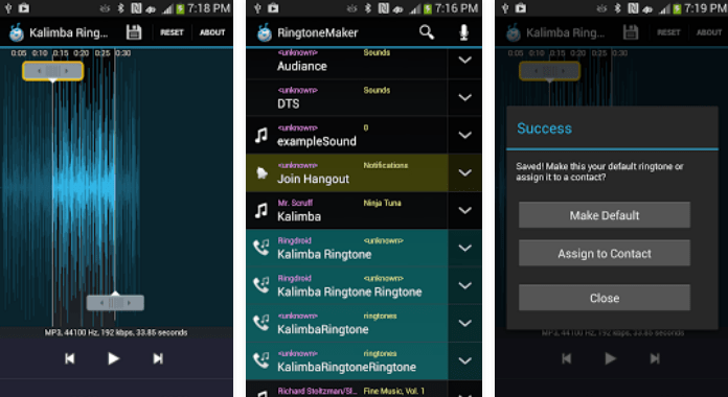
Ringtone Maker allows you create custom ringtones, alarms, notifications, and music clips from audio files or your own recordings. Trim tracks using a waveform, set precise start and end points, preview selections, and save the result in the format you need. You can copy, cut, paste, merge, fade audio in or out, adjust volume, and assign finished ringtones directly to contacts. It supports popular formats including MP3, FLAC, OGG, WAV, AAC, MP4, 3GPP, AMR, and MIDI for flexible editing anywhere.

More Details

Below are some of the notable features of the app:

  • Creates ringtones, alarm sounds, notifications, and music clips from supported audio files.
  • Provides waveform editing with multiple zoom levels and precise time controls.
  • Includes copy, cut, paste, merging, volume adjustment, and fade effects.
  • Records new audio clips and assigns finished ringtones directly to contacts.
How to install the application

How to download and install Ringtone Maker on your mobile device?

Follow these simple steps to get the Ringtone Maker from Google Play:
  1. Open Google Play on your Android device.
  2. Enter Ringtone Maker in the search bar.
  3. Choose the most relevant result from the list.
  4. Tap 'Install' to start the download.
  5. Wait until the installation is complete, and you're ready to go!
DISCLAIMER
  • This application is a mobile tool that does not modify any system settings on your device.
  • All APK files available for download from our platform are completely safe.
  • We offer the official download link directly from the Google Play Store.
  • All trademarks and logos featured on our website belong to their respective owners. We have no affiliation or partnership with them.
  • Our website and its content fully adhere to Google's advertising policies and the Google Unwanted Software policy.
Steps to Uninstall android App

How to remove Ringtone Maker from your mobile device?

You can uninstall the Ringtone Maker app by following these steps:
  1. Open the Settings menu on your phone.
  2. Navigate to "Apps" or "Application Manager."
  3. Find and select Ringtone Maker from the list.
  4. Tap "Uninstall" to remove the app from your device.
Steps to Uninstall App on Apple devices

Delete Ringtone Maker from your iOS device by following these steps:

  1. Open your Home Screen or App Library and locate the Ringtone Maker icon.
  2. Press and hold the icon until a set of options is displayed.
  3. Select Remove App from the list.
  4. Confirm deletion by tapping Delete App.
  5. Exit the screen by tapping Done or pressing the Home button.
Tips & Tricks

More about the Ringtone Maker app

  • Zoom in on the waveform to select more accurate start and end points.
  • Preview your edited clip before saving it as a ringtone or notification sound.
  • Use fade-in and fade-out effects to create smoother audio transitions.
  • Adjust the volume when the original recording is too loud or too quiet.
  • Assign completed ringtones directly to individual contacts for easier identification.


ringtone-maker